Showing posts with label C. Show all posts

Wednesday, 23 September 2015

client server program in c !

In previous tutorial "Introduction to Network Programming using TCP/IP ! " : http://programmingethicalhackerway.blogspot.in/2015/07/introduction-to-network-programming.html, We had learned about socket functions. In this tutorial, we will look at how these functions are used by server-client application. Before we proceeding, let's first we understand what exactly is the server-client ? If i say in simple words, a server is one who serve services and client is one who receive services from server. Consider a case, you are writing a program which hack the victim's computer. The idea of the program may be you are a server and your victim is client. You wrote a malicious client program which spawn shell and send it to the attacker's IP address. Now you send this client program to your victim and whenever your victim run this program, game will over. So, Your victim send shell (cmd.exe or bin/bash) to you and you receive the shell  on your server.

I hope now you get some basic idea of client-server concept. Let us first write server code , then client code. Don't get panic after looking code. I will describe each and every line in detail later.

server.c
  1. #include <sys/types.h>
  2. #include <sys/socket.h>
  3. #include <netinet/in.h>
  4. #include <stdio.h>
  5. #include <unistd.h>
  6. #include <stdlib.h>
  7. #include <arpa/inet.h>
  8. #define port 8080
  9. int main()
  10. {
  11.      int fd, newfd, serlength, clienlength, num;
  12.      int yes =1;
  13.     
  14.      struct sockaddr_in server;            
  15.      struct sockaddr_in clienlen;       
  16.  
  17.      char buffer[1024];
  18.      char *msg = "Recived your message. Good Bye\n";
  19.     
  20.     
  21.      fd=socket(AF_INET, SOCK_STREAM, 0);    
  22.      if (fd < 0)
  23.         perror("Error in Opening socket");
  24.      if (setsockopt(fd,SOL_SOCKET, SO_REUSEADDR, &yes, sizeof(int)) == -1)       
  25.         perror("Error in reusing address\n");
  26.      server.sin_family=AF_INET;                   
  27.      server.sin_addr.s_addr=INADDR_ANY;           
  28.      server.sin_port=htons(port);                 
  29.      serlength=sizeof(server);
  30.      if (bind(fd, (struct sockaddr *)&server, serlength) < 0)
  31.           perror("Error in binding socket");
  32.      clienlength=sizeof(clienlen);                       
  33.      if (listen(fd,10) < 0)                                
  34.           perror("Error in listening");
  35.      while (1) {
  36.          newfd =accept(fd, (struct sockaddr *)&clienlen, &clienlength);      
  37.          if (newfd < 0)
  38.             perror("Error in Accepting");
  39.         printf("A connection has been accepted from %s\n", inet_ntoa((struct in_addr)clienlen.sin_addr));
  40.          num = recv(newfd,buffer,1023,0);                   
  41.          printf("Recieve %d bytes from client\n",num);
  42.          if (num == -1) {
  43.             perror("Error in Reading");
  44.          }
  45.          else {
  46.            buffer[num]='\0';
  47.            printf("Message from client : %s\n",buffer);   
  48.            serlength = strlen(msg);
  49.            num = send(newfd,msg,serlength,0);               
  50.            if (num < serlength)
  51.                 perror("Error in writing");
  52.            if (close(newfd) == -1)
  53.                 perror("Error in closing");
  54.                 
  55.      }
  56.      }
  57.     
  58. }

Now i will explain step by step.
The header file #include <sys/types.h> contains definitions of a number of data types used in system calls.
The header file #include <netinet/in.h> contains constants and structures needed for internet domain addresses.
The header file #include <sys/socket.h> includes a number of definitions of structures needed for sockets.
The Two variables fd and newfd are file descriptors and store the values returned by the socket system call and the accept system call. clienlen stores the size of the address of the client. num is the return value for the read() and write() calls.

A sockaddr_in is a structure containing an internet address.We have already discussed about this  structure in our previous tutorial.

The socket() system call creates a new socket. It takes three arguments as we already discussed previously. If the socket call fails, it returns -1.

The setsockopt() function allow us to reuse a given address for binding. Without this option set, when the program tries to bind to a given port, it will fail if that port is already in use.

The variable server is a structure of type struct sockaddr_in. This structure has four fields and set accordingly our requirement.

Now The bind() call passes the socket file descriptor, the address structure,  and the length of the address structure.

The listen() call tells the socket to listen for incoming connections. It takes two arguments. The first argument is the socket file descriptor, and the second is the the number of connections that can be waiting.

The accept() call actually accepts an incoming connection.The accept() system call causes the process to block until a client connects to the server.It takes three arguments. The accept() function returns a new socket file descriptor for the accepted connection. This way, the original socket file descriptor can continue to be used for accepting new connections, while the new socket file descriptor
is used for communicating with the connected client.

Once a connection has been established, everything written by the client will be read by the server, and everything written by the server will be read by the client. So when our connection has been established, we will receive a message from our client and then our server send a message "Received your message. Good Bye!" to the client.


if  this code is still not clear to you, then i would recommend you:
1 . C  programming for hackers.
2. Introduction to Network Programming using TCP/IP !
In the next post, we will discuss about client program.

If you like this post or have any question, please feel free to comment!

Tuesday, 21 July 2015

Introduction to Network Programming using TCP/IP !

The client server programming is the most common type(other is P2P network) of network applications. A server is a program(like Google,Yahoo) that provides services to client(like You). A client is a program that access these services by connecting to a server program.
A socket is the mechanism that most popular operating systems provide to give programs access to the network. It allows messages to be sent and received between applications on different networked machines. There are several different types of sockets that determine the structure of the transport layer .The most common types are stream sockets(TCP) and datagram sockets(UDP). Sockets are created using a system call, and each socket created by the operating system is identified by a small integer called a socket descriptor.The system calls for establishing a connection are somewhat different for the client and the server, but both involve the basic construct of a socket. When an application calls a socket, the operating system allocates a new data structure to hold the information needed for client server communication. Once a socket has been created, it either waits for an incoming connection, called a passive socket,or initiates a connection, called an active socket. A server creates passive socket and a client creates an active socket.
Server Examples : web server(port 80) , FTP server(port 21), Mail server(port 25)
Client Examples : Web-browsers.

Socket Functions :
These functions have their prototypes defined in /usr/include/sys/sockets.h.
1. socket() : create an endpoint for communication
SYNOPSIS : socket(int domain, int type, int protocol);

2. connect() : initiate a connection on a socket.
SYNOPSIS : connect(int fd, struct sockaddr *remote_host, int addr_length);

3.bind() : bind a name to a socket
SYNOPSIS :bind(int fd, struct sockaddr *local_addr, socklen_t addr_length);

4. listen() : listen for connections on a socket.
SYNOPSIS : listen(int fd, int backlog_queue_size);

5.accept(): accept a connection on a socket.
SYNOPSIS : accept(int fd, sockaddr *remote_host, socklen_t *addr_length);

6. send() : Sends n bytes from *buffer to socket fd.
SYNOPSIS :send(int fd, void *buffer, size_t n, int flags)

7. recv() : Receives n bytes from socket fd into *buffer.
SYNOPSIS :recv(int fd, void *buffer, size_t n, int flags)

The steps involved in establishing a socket on the client side are as follows:
1.Create a socket with the socket() system call
2.Connect the socket to the address of the server using the connect() system call
3.Send and receive data. There are a number of ways to do this, but the simplest is to use the read() and write() system calls.

The steps involved in establishing a socket on the server side are as follows:
1.Create a socket with the socket() system call
2.Bind the socket to an address using the bind() system call. For a server socket on the Internet, an address consists of a port number on the host machine.
3.Listen for connections with the listen() system call
4.Accept a connection with the accept() system call. This call typically blocks until a client connects with the server.
5. Send and receive data

This can be understood by a simple diagram :


Socket Addresses :
Many of the socket functions reference a sockaddr structure to pass address information that defines a host.
Generic socket addresses :
struct sockaddr {
    uint8_t sa_len;                /* total length of address  */
    sa_family_t sa_family;         /*  family of address */
    char sa_data[14];              /*   the address itself*/
};

sa_data contain a destination address and port number for socket.

To deal with struct sockaddr, programmer created a parallel structure i.e. struct  sockaddr_in(IPv4)

struct sockaddr_in {
    uint8_t sin_len;               /*  total length of adress */
    sa_family_t sin_family;         /*   family of address */
    in_port_t sin_port;             /*  port to connect to */
    struct in_addr sin_addr;         /*  host's IP address */
    char sin_zero[8];                 /* padding, ignored  */
};


Here we deal with Internet Protocol version 4, which is the protocol family PF_INET,  using the address family AF_INET.


.
Network Byte Order:
The internet protocols specify a format in which binary numbers are passed around between hosts.This format is called network byte order.The port number and IP address used in the AF_INET socket address structure are expected to follow the network byte ordering, which is big-endian. This is the opposite of x86’s little-endian byte ordering, so these values must be converted.
There are several functions specifically for these conversions.

htonl(long value) : Host-to-Network Long
Converts a 32-bit integer from the host’s byte order to network byte order.

htons(short value):  Host-to-Network Short
Converts a 16-bit integer from the host’s byte order to network byte order

ntohl(long value) :Network-to-Host Long
Converts a 32-bit integer from network byte order to the host’s byte order

ntohs(long value)
: Network-to-Host Short
Converts a 16-bit integer from network byte order to the host’s byte order

Internet Address Conversion :

ASCII to Network : inet_aton(char *ascii_addr, struct in_addr *network_addr)

This function converts an ASCII string containing an IP address in dottednumber

format into an in_addr structure.

Network to ASCII : inet_ntoa(struct in_addr *network_addr)

This function converts the other way. It is passed a pointer to an in_addr structure containing an IP address.

Reference : "Hacking: The art of exploitation"
                   "Google"

In the next tutorials we will learn how to write server-client programs.
Note : All the codes given in this blog have been tested under Kali-linux using gcc C compiler.
If you're stuck somewhere, Please feel free to comment !

C File Access-For hackers!

In the previous tutorial, Input and output in C we have talked about standard input and output devices handled by C programming language. Here we will discuss how to open , write, and close the files. we will see how C programmers can create, open, close text or binary files for their data storage. C programming language provides access on high level functions as well as low level (OS level) calls to handle file on your storage devices.

Consider a case, you hacked a system remotely and there is a text file which contains userID and password. you can't read without double clicking  on it. In this type of case where you have to read a file without physical contact, you need to write a program that reading contents of file. Here we will learn how to Opening Files, reading contents, writing, and close the file.


Opening Files:
Before we start, let's understand an important data type FILE .
When accessing files through C, the first necessity is to have a way to access the files. For C File I/O you need to use a FILE pointer, which will let the program keep track of the file being accessed. it points to structure that contains information about file, such as location of a buffer, weather the file is being read or written etc. but user don't need to know these details:
FILE *
You can think of it as the memory address of the file or the location of the file.
For example:
FILE *fp;

You can use the fopen( ) function to create a new file or to open an existing file:
FILE *fpoen(char *filename, char *mode);
Here filename is the C string containing the name of the file to be opened and mode is the C string containing a file access mode.
This function fopen() opens the filename pointed to, by filename using the given mode.  Once you've opened a file, you can use the FILE pointer to let the compiler perform input and output functions on the file.
The access mode can have one of the following values:
Mode                 Description
r                open for reading
w                    open for writing (file need not exist)
a                  open for appending (file need not exist)
r+                 open for reading and writing, start at beginning
w+                 open for reading and writing (overwrite file)
a+                 open for reading and writing (append if file exists)

If you are going to handle binary files then you will use below mentioned access modes instead of the above mentioned:
"rb", "wb", "ab", "rb+", "r+b", "wb+", "w+b", "ab+", "a+b"
Upon successful completion, fopen() shall return a pointer to the object controlling the stream. Otherwise, a null pointer shall be returned, and errno shall be set to indicate the error.
Here's a simple example:
FILE *fd;
fd=fopen("usernameandpassword.txt", "r");

After opening file, the next thing to do is to read or write the file. There are several ways provided by C, of wich getc and putc are the simplest. The two functions getc() and putc() are the most basic functions of C. They are used to read the character and to display the character.

Reading a File:
The function getc() reads a character from a file referenced by file pointer opened in read mode using fopen():
int getc(FILE *fd);
Here fd is the pointer to a FILE object that identifies the stream on which the operation is to be performed. getc() returns the next character on the given input stream and increments the stream's file pointer to the next character. It reaches EOF marker after reaching the end of  file.

There are another functions for read a file:
1. fgetc() :
fgetc() function to read a single character from a file:
int fgetc( FILE * fd );
The fgetc() function reads a character from the input file referenced by fd.
fgetc() and getc() are equivalent except that if getc() is a macro, it may evaluate fd more than once.
2. fgets() :
char *fgets( char *buf, int n, FILE *fd );
The functions fgets() reads up to n - 1 characters from the input stream referenced by fd. It copies the read string into the buffer buf, appending a null character to terminate the string.

Writing a File:
putc is an output function:
int putc(int c, FILE *fd);
putc writes the character c to the file fd and returns the character written, or EOF if an error occurs.

There are another functions for write a file:
1. fputc():
function to write individual characters to a stream:
int fputc( int c, FILE *fd );
The function fputc() writes the character c to the output stream referenced by fd.It returns the character written, or EOF for error.
2.fputs():
functions to write a null-terminated string to a stream:
int fputs( const char *s, FILE *fd );
The function fputs() writes the string s to the output stream referenced by fd. It returns a non-negative value on success, otherwise EOF is returned in case of any error.

getchar and putchar can be defined in terms of getc, putc, stdin, and stdout:
getchar() is equivalent to getc(stdin)
putchar(c) is equivalent to putc(c,stdout)

For formatted input or output of files, the function fscanf and fprintf may be used. These are identical to scanf and printf, except that the first argument is a file pointer that specifies the file to be read or written; the format string is the second argument :
int fscanf(FILE *fd, char *format, ...)
int fprintf(FILE *fd, char *format, ...)

Closing a File :
To close a file, use the fclose( ) function. The function:
int fclose(FILE *fd);
is the inverse of fopen; it breaks the connection between the file pointer and external name that was established by fopen, freeing the file pointer for another file.

Binary file I/O - fread and fwrite:
For binary File I/O you use fread and fwrite:
size_t fread(void *ptr, size_t size_of_elements, size_t number_of_elements, FILE *a_file);             
size_t fwrite(const void *ptr, size_t size_of_elements, size_t number_of_elements, FILE *a_file);
Both of these functions deal with blocks of memories - usually arrays. Because they accept pointers, you can also use these functions with other data structures; you can even write structs to a file or a read struct into memory.

 If you like this post or have any question, please feel free to comment !

Monday, 20 July 2015

Input and output in C!

There are two primary ways to access files in C: file descriptors and file streams. File descriptors use a set of low-level I/O functions, and file streams are a higher-level form of buffered I/O that is built on the lower-level functions. Here,the focus will be on the low-level I/O functions that use file descriptors.

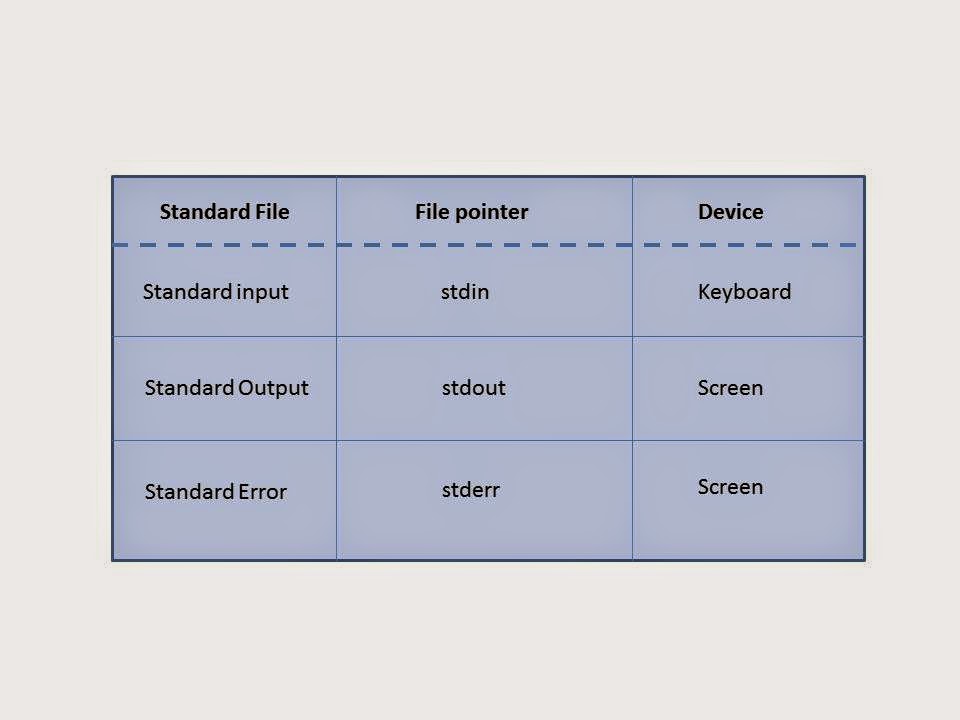
In this tutorial we will describe the standard library, a set of functions that provide input and output, and a variety of other services for C programs. The Input means to feed some data into program. The Output means to display some data on screen, printer or in any file. When a C program is started,three file are automatically opened  to provide access to the keyboard and screen. These file are :
standard input
standard output
standard error


The corresponding file pointer are called stdin,stdout, and stderr and are declared in <stdio.h> . Normally stdin is connected to the keyboard and stdout and stderr are connected to the screen. stdin and stdout may be redirect to files and pipes.

Standard Input and Output :
Suppose you hack a server and now you want to execute some commands on compromised server.To do so, first you write a program that takes your command(standard input) and execute it and prints the results(standard output) on the screen. So to read on character at a time from the standard input, normally the keyboard :
int getchar(void);
getchar() function reads the next available character from the screen and returns it as an integer. This function reads only single character at a time. You can use this method in the loop in case you want to read more than one characters from the screen.

The function
int putchar(int);
is used for output. putchar(c) put the character c on the standard output, which is by default the screen.

Let's consider a simple program:
  1. #include <stdio.h>
  2. int main( )
  3. {
  4.    int a;

  5.    printf( "Enter Command :");
  6.    a = getchar( );

  7.    printf( "\nYou entered: ");
  8.    putchar( a );

  9.    return 0;
  10. }

Formatted Input and Output:
Reading and writing data one character at a time can be painful. The C standard I/O library provides several convenient routines for reading and writing formatted data. C provides standard functions scanf() and printf(), for performing formatted input and output .

Formatted Output:
The function is defined as follows:
int printf(char *format, arg1, arg2 ...)
writes output to the standard output stream stdout and produces output according to a format provided. where arg1, arg2 .... are argument list.

Example:
printf (“%c”, arg);
The character specified after % is called a conversion character because it allows one data type to be converted to another type and printed.

Formatted input:
This function is defined as follows:
int scanf(char *format, args....)
reads input from the standard input stream stdin and scans that input according to format provided.

For Example:
scanf(“ %c %d”,&Name, &Roll_No);
the data names are listed as &Name and &Roll_No instead of Name and Roll_No respectively. This is how data names are specified in a scnaf() function. In case of string type data names, the data name is not preceded by the character &.
The scanf routine eats whitespace (spaces, tabs, newlines, etc.) in its input whenever it sees a conversion specification or a whitespace character in its format string. Non-whitespace characters that are not part of conversion specifications must match exactly. To detect if scanf parsed everything successfully, look at its return value; it returns the number of values it filled in, or EOF if it hits end-of-file before filling in any values.

The format can be a simple constant string, but you can specify %s, %d, %c, %f, etc., to print or read strings, integer, character or float respectively. There are many other formatting options available which can be used based on requirements. For a complete detail, The C programming language by Dennis M. Ritchie .

Here is the simple example which makes things clear:

  1. #include <stdio.h>
  2. int main( )
  3. {
  4.    char arr[100];
  5.    int a;

  6.    printf( "Enter a value :");
  7.    scanf("%s %d", arr, &a);

  8.    printf( "\nYou entered: %s %d ", arr, a);

  9.    return 0;
  10. }

Well this is all about standard input and output devices handled by C programming language.After handling input and output, the next step is how to open , write, and close the files. In the next tutorial, we will see how C programmers can create, open, close text or binary files for their data storage.

If you like this post or have any question, please feel free to comment !

Memory Allocation in C !

The hacker must understand the way C organizes memory for its program. As we have already discussed, a C compiled program’s memory is divided into five segments: text, data, bss, heap, and stack.


The text segment is also sometimes called the code segment. This is where the assembled machine language instructions of the program are located.The data and bss segments are used to store global and static program variables. The data segment is filled with the initialized global and static variables, while the bss segment is filled with their uninitialized counterparts.The heap segment is a segment of memory a programmer can directly control. Blocks of memory in this segment can be allocated and used for whatever the programmer might need.The stack is used for holding the return addresses at function calls, arguments passed to the functions, and local variables for functions.

Dynamic and static allocation of memory :
The golden rule of computers states that anything and everything(data or instruction) that needs to be processed must be loaded into internal memory before its processing takes places. Therefore, every data and instruction that is being executed must be allocated some area in the main memory.
The main memory is allocated in two ways:
Statically
Dynamically

Static memory allocation: In static memory allocation, memory is allocated while writing the C program. Actually, user requested memory will be allocated at compile time. Memory size can’t be modified while execution.
Example: array
Dynamic memory allocation:In dynamic memory allocation, memory is allocated while executing the program. That means at run time.Memory size can be modified while execution.
Example: Linked list

Dynamic memory allocation functions in C:
C language inherently does not has any technique to allocated memory dynamically, there are 4 library functions under "stdlib.h" for dynamic memory allocation:
Function        Syntax                                                                                   Description
malloc()       malloc (number *sizeof(int));          Allocates requested size of bytes
                                                                                                          and returns a pointer first byte
                                                                                                          byte of allocated space


calloc()     calloc (number, sizeof(int));     Allocates space for an array elements,
                                                                                                       initializes to zero and then returns a
                                                                                                       pointer to memory
realloc()    realloc(pointer_name,number *sizeof(int));Change the size of
                                                                                                                         previously allocated space

free()        free (pointer_name);                        dellocate the previously allocated space   


malloc():
malloc () function is used to allocate space in memory during the execution of the program.
Here is the prototype:
void* malloc(size_t size);
type “size_t” is used for defining sizes of strings and memory blocks.The size_t argument is the size of memory block you want to be allocated to your code by the operating system.
malloc() returns a pointer to a void. it doesn't care weather you are allocating this memory to store character, interger etc. , it simply returns void data types. We can correct this using a technique call a “typecasting”.
malloc () does not initialize the memory allocated during execution.  It carries garbage value.
The malloc() function returns a pointer to an area of memory with size of byte size. If the space is insufficient, allocation fails and returns NULL pointer.

num=(int*)malloc(100*sizeof(int));
This statement will allocate either 200 or 400 according to size of int 2 or 4 bytes respectively and the pointer points to the address of first byte of memory.

calloc() : 
calloc () function is also like malloc () function. The only difference between malloc() and calloc() is that, malloc() allocates single block of memory whereas calloc() allocates multiple blocks of memory each of same size  and sets all bytes to zero.
Here is the prototype:
void  *calloc(size_t n, size_t size);

num=(float*)calloc(25,sizeof(float));
This statement allocates contiguous space in memory for an array of 25 elements each of size of float, i.e, 4 bytes.

free():
Dynamically allocated memory with either calloc() or malloc() does not get return on its own. The programmer must use free() explicitly to release space.

free(num);
This statement cause the space in memory pointer by num to be deallocated.

realloc():
If the previously allocated memory is insufficient or more than sufficient. Then, you can change memory size previously allocated using realloc(). realloc() function modifies the allocated memory size by malloc () and calloc () functions to new size.
Here is the prototype:
void  *realloc(void *num, size_t newsize);
If enough space doesn’t exist in memory of current block to extend, new block is allocated for the full size of reallocation, then copies the existing data to new block and then frees the old block.

Stack vs Heap allocation:
Stack:
very fast access
don't have to explicitly de-allocate variables
space is managed efficiently by CPU, memory will not become fragmented
local variables only
limit on stack size (OS-dependent)
variables cannot be resized

Heap :
variables can be accessed globally
no limit on memory size
slower access
no guaranteed efficient use of space, memory may become fragmented over time as blocks of memory are allocated, then     freed
you must manage memory (you're in charge of allocating and freeing variables)
variables can be resized using realloc()

When to use the Heap?
When should you use the heap, and when should you use the stack? If you need to allocate a large block of memory (e.g. a large array, or a big struct), and you need to keep that variable around a long time (like a global), then you should allocate it on the heap. If you are dealing with relatively small variables that only need to persist as long as the function using them is alive, then you should use the stack, it's easier and faster. If you need variables like arrays and structs that can change size dynamically (e.g. arrays that can grow or shrink as needed) then you will likely need to allocate them on the heap, and use dynamic memory allocation functions like malloc(), calloc(), realloc() and free() to manage that memory "by hand". We will talk about dynamically allocated data structures after we talk about pointers.

Reference:
Memory : Stack vs Heap

If you like this post or have any question, please feel free to comment !

C Programming Pointers!

Pointer:
The C language gives you a lot more control over how your program uses the computer’s memory. Pointers are one of the most feared things in the C language. In fact, they are the one thing that makes this  language challenging at all.They can cause huge headaches if you don't know what you're doing when you try to mess with them.

Get Comfortable with Pointers:
One of the biggest things that other C-influenced 3GL and 4GL languages, such as Java and Python, attempted to do was automate how dynamic memory is managed to minimize the human error. In C, the functions  defined in the <stdlib.h> header, malloc(), realloc() and free(), that allow for managing memory on the heap make use of  pointers.
First let's understand what is memory?
In previous tutorials ,we have learned about memory in the x86 architecture. It is a series of “boxes”, each able to hold a number between 0 - 255 (0x00 - 0xFF). Each box has an address. A memory address in x86 is one word, or 4 bytes so memory addresses range from 0x00000000 - 0xFFFFFFFF.
Pointers are special pieces of memory that hold the address of other pieces of memory. Moving data around inside of memory is a relatively slow operation. It turns out that instead of moving data, keeping track of the location of items in memory through pointers and simply changing the pointers is much easier.
In other words, Since the physical memory cannot actually be moved, the information in it must be copied. It can be very computationally expensive to copy large chunks of memory to be used by different functions or in different places. This is also expensive from a memory standpoint, since space for the new destination copy must be saved or allocated before the source can be copied. Pointers are a solution to this problem. Instead of copying a large block of memory, it is much simpler to pass around the address of the beginning of that block of memory.

Difference between pointer and variable:
when a variable of any data type is declared the variable’s value is stored in addressed memory.A variable is composed of a value and the memory address that holds that value. A memory address is not  a variable because it is composed of one value and that value is itself which is constant. A pointer, on the other hand, is a variable whose value is the reference of the memory address of a given variable. Or in simple words, A pointer is a variable whose value is the address of another variable, i.e., direct address of the memory location. With that definition in mind, a pointer is composed of a value,  which is the address of the variable being pointed to, and its memory address as well.
Pointers in C can be defined and used like any other variable type. Since memory on the x86 architecture uses 32-bit addressing, pointers are also 32 bits in size (4 bytes). Pointers are defined by prepending an asterisk (*) to the variable name. Instead of defining a variable of that type, a pointer is defined as something that points to data of that type.
you can declare a variable in C:
int x;  // This declares an integer, x

To declare a pointer:
int *x;
This declares a pointer to an integer. The pointer is called x. We use the * to indicate a pointer. This declaration creates a pointer called x, not an integer. x does not store an int. It stores a memory location that points to an int.
We can’t use this to store an integer yet, because there is no where to store it.
There are two types of  pointer declarations :
int  *pointerName;
int*  pointerName;
They are equivalent to each other but if you are interested you can go on to say that they do not mean the same.
int *pointerName means “declare a pointer identified as pointerName to point to a variable whose value is a integer”
while char* pointerName means “declare a pointer identified as pointerName of type integer-to-character”.
So The pointer is a data type. Just as you have short int and long it, you have pointer-to-character, pointer-to- integer, etc.

Assignment and Dereferrencing: Let's write a simple pointer program :
int main{
    int a; //declare a normal variable
    int *p; //declared a integer pointer, but is uninitialized and points to garbage
    p = &a; //deference the pointer variable, p now "points to" a and store the memory address of a into p
    a = 5; //store value to the variable a
}
Now suppose a is stored at an address "250" and p is at "100". Consider the diagram of this case:


when you compile and run this code :
int main{
    int a;
    int *p;
    p = &a;
    a = 5;
    print p;
    print &a;
    print &p;
    print *p;
}
Then the output should be:
250
250
100
5
the code int* p; creates a pointer p and the code int a; creates normal variable a. Pointer p points to some address and that address has garbage value. Similarly, variable a also has garbage value at this point.

Now, the code a=5; makes the value of a equal to 5, i.e.,5 is stored in the memory location of variable a.

Now, the code p = &a; makes pointer, point to address of a. Note that, &a is the address of variable a (because a is normal variable) and p is the address of p (because p is the pointer variable).
The & (ampersand) means “reference”. If you put the & before a variable, it returns the address of the variable, not the value. It is sometimes called “the address of operator”.  The * and & operators are opposites. The & operator takes a piece of data and tells you where it’s stored. The * operator takes an address and tells you what’s stored there.

code a=5; makes the value of a, 5. Since, pointer p is pointing to address of a. Value inside address p will also be 5.

If you add the code:
*p = 8;
print a;
then the output will be 8 because Code *p=8; change the contents of the memory location pointed by pointer p to change to 8. Since address of pointer p is same as address of a, value of a also changes to 8.

That's all the basic of pointers. There are more concepts on pointer like:
C - Pointer arithmetic.
Pointer as function argument .
pointer and array.
pointer and structure
character array and pointers.
character pointers and function.
pointer array and pointer to pointer.
pointer to function.
A very good resource of learning is The C programming lanuguage by Dennis M. Ritchie .

If you like this post or have any question, please feel free to comment !

Concept of structure in C !

A structure is a collection of one or more variables(possibly of different types)under a single name. For instance, you want to store the information about a student like roll no, class, marks etc. The one way to do so is declaring variables separately But C offers Structures to handle such situations under one roof. Thus,it can be said that A structure is a collection of variables referenced under one name.

Syntax of structure :
struct first {
     /*member element declarations */
}
The keyword  struct tells the compiler that a structure is being defined. An optional name called a structure tag may follow the struct(as with first here).

Let's take a example:
struct student{
    int roll_no;
    char name;
    int class;
    float marks;
}
In the above definition, the student is a structure tag.At this point of time(i.e. after the above definition), no structure variable has been declared, that is, no memory has been reserved. So a structure declaration that is not followed by a list of variables reserves no storage.

Structure variable declaration :
Now after defining  structure , we need to declare structure variable.
To declare a structure variable having the data form as defined by student, we write
student senior_student;
Now,
struct student{
    int roll_no;
    char name;
    int class;
    float marks;
}student senior_student;
structure senior_student will be having its elements as roll_no , name , class etc.

Alternatively we can write
struct student{
    int roll_no;
    char name;
    int class;
    float marks;
}senior_student;
Both have same meaning.

Referencing structure elements:
There are two types of operators used for accessing members of a structure:
1. Member operator( . )
2. Structure pointer operator( -> )
General syntax for access structure element by memory operator is :
structure_name.member;
Suppose, we want to access name for variable senior_student. Then, it can be accessed as:
senior_student.name;
The Structure pointer operator( -> ) will discuss in pointer section.

Structure and functions:
Structure can be passed to functions by value as well as by reference just like other variable.

Typedef :
C provides a facility called typedef for creating new data type names
For example, the declaration
typedef int student;
makes the name student a synonym for int. The type student can be used in declaration casts etc., in exactly same way that the type int can be:

student roll_no, marks;

difference between typedef and #define :
typedef is similar to #define(The #define is a C-directive which is also used to define the aliases for various data types), except that typedef is interpreted by the compiler where as #define statements are processed by the pre-processor.

Unions:
A union is a special data type available in C that enables you to store different data types in the same memory location. You can define a union with many members, but only one member can contain a value at any given time.
The syntax is based on structures:
union u_tag{
    int val;
    float fval;
    char cval[20];
}u;
The u_tag is optional. Now, a variable of u_tag type can store an integer, a floating-point number, or a string of characters. This means that a single variable i.e. same memory location can be used to store multiple types of data.

The memory occupied by a union will be large enough to hold the largest member of the union. For example, in above example u_tag type will occupy 20 bytes of memory space because this is the maximum space which can be occupied by character string.
let's see:

#include <stdio.h>
#include <string.h>

union Data
{
   int i;
   float f;
   char  str[20];
};

int main( )
{
   union Data data;       

   printf( "Memory size occupied by data : %d\n", sizeof(data));

   return 0;
}

it produces the following result:
 Memory size occupied by data : 20


Syntactically, members of a union are accessed as
union_name.member
or
union_name->member
just as for structures.

union may occur within structures and arrays, and vice versa.

Difference between union and structure:

#include <stdio.h>
union student_union {        
   char name[32];
   float marks;
   int roll_no;
}u;
struct student_struct {
   char name[32];
   float marks;
   int roll_no;
}s;
int main(){
   printf("size of union = %d \n",sizeof(u));
   printf("size of structure = %d", sizeof(s));
   return 0;
}
When the above code is compiled and executed, it produces the following result:                                                           


As you can see,There is difference in memory allocation between union and structure
The amount of memory required to store a structure variables is the sum of memory size of all members:
name+marks+roll_no = 32+4+4 = 40 bytes
But, the memory required to store a union variable is the memory required for largest element of an union:
name = 32 bytes
Another difference is, all members of structure can be accessed at any time. But, only one member of union can be accessed at a time in case of union and other members will contain garbage value.

Bit Fields :
When storage is at a premium, it may be necessary to pack several objects into a single machine word i.e. 0 or 1 .The C programming language offers a better way to utilize the memory space in such situation.
Suppose a C program contains a number of TRUE/FALSE variables grouped in a structure called status, as follows:

struct
{
  unsigned int width;
  unsigned int height;
} status;

This structure requires 8 bytes of memory space but in actual we are going to store either 0 or 1 in each of the variables.  If you are using such variables inside a structure then you can define the width of a variable which tells the C compiler that you are going to use only those number of bytes.
More detail Bit Field .

If you like this post or have any question, please feel free to comment !

Concept of Array - for hackers!

An array allows us to declare a collections of variables that referenced by a common name.
Suppose you have to write a program which stores marks of 50 students.
In normal way, you declare  50 variables  which store the value of 50 student's marks. So instead of creating individually variables, this can be done by using Arrays. Instead of declaring individual variables, such as marks0, marks1, ..., and marks49, you declare one array variable such as "marks" and use marks[0], marks[1], and ..., marks[49] to represent individual variables. A specific element in an array is accessed by an index.

The concept of array is very-very important for hackers. Most of exploits like stack overflow are exist because of improper handling of arrays. A programmer knows how to use array to store data but a hacker knows how to use arrays  perfectly.Stack-based overflows occur when a static-sized local buffer is overflowed by attempting to store more data within the buffer than its fixed size allows. And around 70% exploits are Stack-based overflows. We will discuss later about buffer overflow.

As arrays are Variables, so to use Arrays, they must be declared before they can be used. Arrays are of two types:
One-dimensional arrays
Multidimensional arrays(Two or more)
To declare an array in C, a programmer specifies the type of the elements and the number of elements required by an array as follows:
data_type arrayName [Size];
For example:
int marks[49];
this is declaration of one-dimensional array.

Initialization of one-dimensional array:
int marks[5]={67,89,55,76,67};
pictorial representation of the array we discussed above:


Accessing Array Elements:
An element is accessed by indexing the array name. This is done by placing the index of the element within square brackets after the name of the array.
Let's see:
int result = marks[4];
The above statement will take 4th element from the array and assign the value to result variable.

Passing Arrays as Function Arguments :
When an array is used as an argument to a  function, only the address of the array gets passed, not a copy of entire array. There are 3 ways to declare a parameter that is to receive an array pointer.
First Way: The receiving parameter of the array may itself be declared as an array, as :
int main()
{
    int marks[49];
    .
    .//Function code like initialize array
    .
    .
    result(marks);

}
void result(int m[49]) //receiving parameter has been declared as array with its size.
{
    //Function code
}
Second Way: The receiving parameter may be declared as an unsized array, as:

int main()
{
    int marks[49];
    .
    .//Function code like initialize array
    .
    .
    result(marks);

}
void result(int m[]) //receiving parameter has been declared as array without size.
{
    //Function code
}
Third way: The receiving parameter can be declared as a pointer, as:
int main()
{
    int marks[49];
    .
    .//Function code like intilize array
    .
    .
    result(marks);

}
void result(int *m) //receiving parameter has benn declared as pointer of same base type.
{
    //Function code
}

String: The string in C programming language is actually a one-dimensional array of characters which is terminated by a null character '\0':
char mgs[6] = {'H', 'e', 'l', 'l', 'o', '\0'};

An even easier way of initializing is a string is:
char mgs[6] = “hello”;
Note the use of double quotes here as opposed to the single quotes in the previous example. The double quotes tells the compiler “hello” is a string and a null will automatically be appended to the end.

The null terminator is very significant to some hackers.
consider this code:
char marks[50] = “marks”;
printf(“%s”, marks);

This code will print:
marks

It doesn’t print the entire 50 characters of marks[50]. C will read a string until it reaches the null. If it reaches null before the end of the array, that’s where it stops. Nothing beyond there is read.
The problem occurs when a 0 is found in the code. When the computer comes across a 0, it is interpreted as a null, and the read operation ends.This is very common problem in writing shellcodes. Suppose your shell code were injected into a character buffer overflow, a 0 is occurred at fifth lines, then only the first four lines would execute only. Because  The fifth  line has a zero, which is interpreted as “end of string”.

Now here the question may arise is what is buffer overflow or character buffer overflow ? I think now it is  the perfect time to introduce topic of buffer overflow.

char name[10];
printf(“Please enter your name:\n”);
scanf(“%s”, name);
printf(“Your name is: %s”, name);

Here we declare an char array of size 10. Then we take input(suppose username) from user and then print it out.
A user may or may not supplied a username of length of less than or equal to 10.But what if user supplied more than 10 characters ?
The computer will take this input(more than 10 characters) and store it in memory starting at the address pointed to by ‘name’. The problem is that the code has only put aside 10 bytes for name. suppose You entered 25 characters, Then the remaining 15 characters write over whatever is the in space after the space allocated to ‘name’.
The extra 15 characters would overwrite the return instruction pointer, in essence creating a new value in the EIP register.You can poison the return value while it’s on the stack. In this case, you could inject a new instruction pointer and take control of the execution of the program.

Vulnerable Buffers :
In C language, strings, or buffers, are represented by a pointer to the address of their first byte, and we consider we have reached the end of the buffer when we see a NULL byte. This means that there is no way to set precisely the amount of memory reserved for a buffer, it all depends on the number of characters.
the size problem makes restricting the memory allocated to a buffer, to prevent any overflow, quite difficult. That is why some trouble may be observed, for instance when strcpy is used without care,which allows a user to copy a buffer into another smaller one !
We will discuss more on overflow in upcoming Tutorials.

If you like this post or have any question, please feel free to comment !
Blogger Widget