Tuesday, 21 July 2015

Concept of function in python !

In Python, functions provide organized blocks of reusable code. Typically, this allows a programmer to write a block of code to perform a single, related action. Functions are reusable pieces of programs. They allow you to give a name to a block of statements and you can run that block using that name anywhere in your program and any number of times. This is known as calling the function.

Function Definition: The def and return Statements:
Functions are defined using the def keyword.
We create a function with a def statement and The return statement specifies the result value of the function :
def odd( spin ):
    """Return true if this spin is odd."""
    if spin % 2 == 1:
         return True
    return False


Function Parameters
A function can take parameters which are just values you supply to the function so that the function can do something utilising
those values. These parameters are just like variables except that the values of these variables are defined when we call the
function and are not assigned values within the function itself.
Parameters are specified within the pair of parentheses in the function definition, separated by commas.

Keyword Arguments :
If you have some functions with many parameters and you want to specify only some of them, then you can give values for such
parameters by naming them - this is called keyword arguments

Using Keyword Arguments
#!/usr/bin/python

def func(a, b=5, c=10):
    print 'a is', a, 'and b is', b, 'and c is', c
func(3, 7)
func(25, c=24)
func(c=50, a=100)

Output :
>>> python func.py
a is 3 and b is 7 and c is 10
a is 25 and b is 5 and c is 24
a is 100 and b is 5 and c is 50
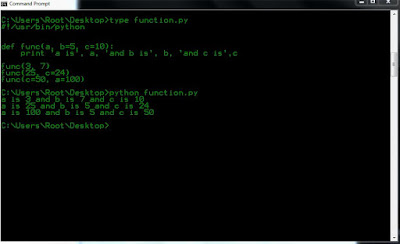


In the first usage, func(3, 7), the parameter a gets the value 3, the parameter b gets the value 5 and
c gets the default value of 10.
In the second usage func(25, c=24), the variable a gets the value of 25 due to the position of the
argument. Then, the parameter c gets the value of 24 due to naming i.e. keyword arguments. The variable
b gets the default value of 5.
In the third usage func(c=50, a=100), we use keyword arguments completely to specify the values.

Type conversion :
Python provides a collection of built-in functions that convert values from one type to another. The int function takes any value and converts it to an integer, if possible :
>>> int("32")
32
>>> int("Hello")
ValueError: invalid literal for int(): Hello


If you like this post or have any question, please feel free to comment!

Conditional Processing and loop concept in python !

In the programs we have seen till now, there has always been a series of statements and Python faithfully executes them in the same order. What if you wanted to change the flow of how it works? This is fine for very simple programs, but most programs, like the driving directions example, aren’t that simple. The driving directions included statements like, Continue on Main Street until you see a church on your right and If the street is blocked because of construction. . . . These statements are known as control structures, and they change the flow of the program’s execution from a simple sequential order to a more complex and more useful flow.

In order to write useful programs, we almost always need the ability to check conditions and change the behavior of the program  accordingly. Conditional statements give us this ability.

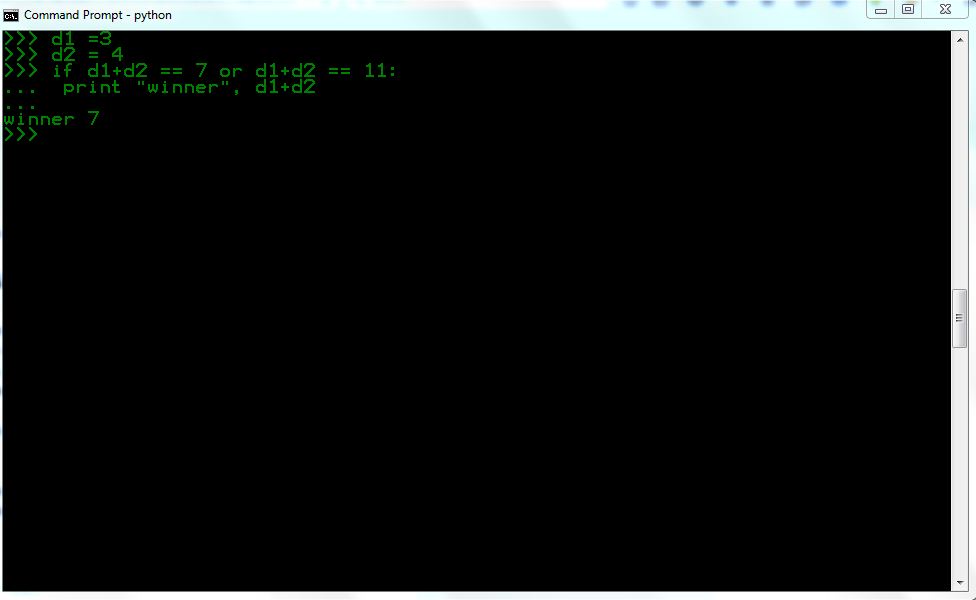
The simplest form is the if statement :
if d1+d2 == 7 or d1+d2 == 11:
print "winner", d1+d2


The boolean expression after the if statement is called the condition. If it is true, then the indented statement gets executed. If not, nothing happens.

Alternative execution:
A second form of the if statement is alternative execution, in which there are two possibilities and the condition determines which one gets executed. The syntax looks like this:
if x%2 == 0:
print x, "is even"
else:
print x, "is odd"


Chained conditionals:
Sometimes there are more than two possibilities and we need more than two branches. One way to express a computation like that is a chained conditional:
point= None
if d1+d2 == 7 or d1+d2 == 11:
print "winner"
elif d1+d2 == 2 or d1+d2 == 3 or d1+d2 == 12:
print "loser"
else:
point= d1+d2
print "point is", point

elif is an abbreviation of “else if.” Again, exactly one branch will be executed.

The return statement allows you to terminate the execution of a function before you reach the end. One reason to use it is if you  detect an error condition:
import math
def printLogarithm(x):
if x <= 0:
print "Positive numbers only, please."
return
result = math.log(x)
print "The log of x is", result


The pass Statement:
The pass statement does nothing. Use the pass statement to fill in the required suite of statements.
if n%2 == 0:
pass # Ignore even values
else:
count += 1 # Count the odd values


Keyboard input :
The programs we have written so far are a bit rude in the sense that they accept no input from the user. They just do the same thing every time.
Python provides built-in functions that get input from the keyboard. The simplest is called raw input. When this function is called, the program stops and waits for the user to type something.
#!/usr/bin/python
number = 23
guess = int(raw_input('Enter an integer : '))
if guess == number:
print 'Congratulations, you guessed it.'


If you like this post or have any question, please feel free to comment!
Loops in python !

The concept of loop is important for both programmer and hackers.
For programmer, you want to execute some code 50 times then instead of writing that code 50 times, you can do it  by writing that code only one time and repeat the execution 50 times with the help of loop.
Simply we can say, A loop allow us to execute a statement multiple times in our program.
For hacker, you want to crack Facebook password ;-) and you have a word-list of 100 passwords, you can do it by attempt manually. The other way of cracking password is by writing a loop program which simply attempt password 100 times.

The for loop : The for loop in python iterates over a sequence of objects i.e. go through each item in a sequence.for loop is used when you want to loop for a certain number of iterations. for loops start counting at a beginning value, test the value for some condition,execute the statement, and increment the value for the next iteration.

for i in range(1, 5):
         print i
else:
        print 'The for loop is over'


What we do here is supply it two numbers and range returns a sequence of numbers starting from the first number and up to the second number. For example, range(1,5) gives the sequence [1, 2, 3, 4]. By default, range takes a step count of 1. If we supply a third number to range, then that becomes the step count. For example, range(1,5,2) gives [1,3]. The for loop then iterates over this range - for i in range(1,5) is equivalent to for i in [1, 2, 3, 4]

Basically The range function has 3 forms:
range (x) generates x distinct values, from 0 to x-1, incrementing by 1.
range (x, y) generates y-x distinct values from x to y-1, incrementing by 1.
range (x, y, i) generates values from x to y-1, incrementing by i: [ x, x+i, x+2i, ... x+ki < y ]


>>> for o in range(1,36,2):
...     print o
...
1
3
5
7
9
11
13
15
17
19
21
23
25
27
29
31
33
35


Note : The Python for loop is radically different from the C/C++ for loop.
In C/C++, if you want to write for (int i = 0; i < 5; i++), then in Python you write just for i in range(0,5).


The while Statement :
if you use while loop in your program that means you want to execute a set of instructions in a loop while a condition is true. It tests the conditions before executing the loop body.
Let's understand with  a example :
number = 23
running = True
while running:
    guess = int(raw_input('Enter an integer : '))
    if guess == number:
        print 'Congratulations, you guessed it.'
    running = False # this causes the while loop to stop
    elif guess < number:
        print 'No, it is a little higher than that.'
    else:
        print 'No, it is a little lower than that.'
else:
print 'The while loop is over.'

print 'Done'


We move the raw_input and if statements to inside the while loop and set the variable running to True before the while loop.

More Iteration Control: break and continue
The break statement terminates a loop prematurely. This allows a complex condition to terminate a loop. A break statement is always found within if statements within the body of a for or while loop. A break statement is typically used when the terminating condition is too complex to write as an expression in the while clause of a loop. A break statement is also used when a for loop must be abandoned before the end of the sequence has been reached.

The continue statement skips the rest of the loop's suite. Like a break statement, a continue statements is always found within an if statement within a for or while loop. The continue statement is used instead of deeply nested else clauses.

Using the break statement
#!/usr/bin/python
# Filename: break.py
while True:
s = raw_input('Enter something : ')
if s == 'quit':
break
print 'Length of the string is', len(s)
print 'Done'


We are providing a special condition to stop the program by checking if the user input is 'quit'. We stop the program by breaking out of the loop and reach the end of the program.

The continue statement :
#!/usr/bin/python
# Filename: continue.py
while True:
s = raw_input('Enter something : ')
if s == 'quit':
break
if len(s) < 3:
continue
print 'Input is of sufficient length'

In this program, we accept input from the user, but we process them only if they are at least 3 characters long.
  
If you like this post or have any question, please feel free to comment!

Concept of dictionaries in python !

The Python dictionary data structure provides a hash table that can store any number of Python objects. The dictionary consists of pairs of items that contain a key and value. Or if i say in simple words, A dictionary is like an address-book where you can find the address or contact details of a person by knowing only his/her name i.e. we associate keys (name) with values (details). Note that the key must be unique just like you cannot find out the correct information if you have two persons with the exact same name.
A dictionary is like a list, but more general. In a list, the indices have to be integers; in a dictionary they can be (almost) any type.

Python vs. Perl: Dictionaries
A dictionary in Python is like a hash in Perl. In Perl, variables that store hashes always start with
a % character. In Python, variables can be named anything, and Python keeps track of the datatype
internally.

Python vs. Java: Dictionaries
A dictionary in Python is like an instance of the Hashtable class in Java.

Defining Dictionaries :
>>> services = {'ftp':21,'ssh':22,'smtp':25,'http':80}
>>> services
{'ftp': 21, 'smtp': 25, 'ssh': 22, 'http': 80}  


First, you create a new dictionary with four elements and assign it to the variable services. Each element is a key-value pair, and the  whole set of elements is enclosed in curly braces. Here ftp,smtp,ssh,http are keys.

Dictionary Methods :
clear(): Remove all items from the dict.
pop(key, [default]) :Remove the given key from the dict, returning the associated value.
update(new, [key=value...]): Merge values from the new new into the original dict, adding or replacing as needed.
copy(): Copy the dict to make a new dict.
get(key, [default]): Get the item with the given key, similar to ‘dict[key]’.
items():  Return all of the items in the dict as a sequence of (key,value) 2-tuples
keys(): Return all of the keys in the dict as a sequence of keys.
values(): Return all the values from the dict as a sequence.

For example , When we scanning specific TCP ports, it may prove useful to have a dictionary that contains the common service names for each port. Creating a dictionary, we can lookup a key like ftp and return the associated value 21 for that port.
>>> services = {'ftp':21,'ssh':22,'smtp':25,'http':80}
>>> services.keys()
['ftp', 'smtp', 'ssh', 'http']
>>> services.items()
[('ftp', 21), ('smtp', 25), ('ssh', 22), ('http', 80)]
>>> services.values()
[21, 25, 22, 80]
>>>


So For Get tuples of items : dict.items()
#method .items() will return an entire list of items in the dictionary.

Get list of of keys : dict.keys()
# method .keys() will return a list of all keys in the dictionary.

Get list of values : dict.values()
# method .values() will return an entire list of values in the dictionary

Note : When you add a key to a dictionary, you must also add a value for that key :
>>> services ["ssl"] = "443"
>>> services
{'ftp': 21, 'smtp': 25, 'ssh': 22, 'http': 80, 'ssl': '443'}
>>>

  
If you like this post or have any question, please feel free to comment!
Blogger Widget